

ScreenDataPro
If you have it on the screen, data are your's.
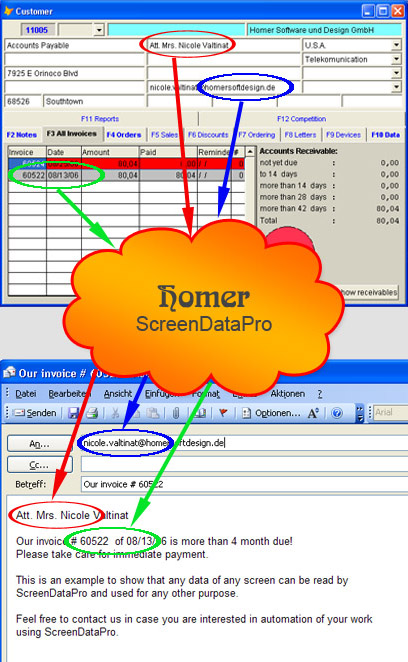
It was a bit funny! A programmer had certainly spent a lot of time to crypt data from a patient register in the corresponding tables. Almoust no chance to read them from disc. When you scrolled the records on the nicely organized forms, you had about 25 fields with data you wanted to transfer to a CRM system. And there comes ScreenDataPro. It gets the information of the area where the specific information is displayed and reads it from the screen. A routine within Tool&Task receives the read pattern of chars and you or we once buid a table to combine read bitmap patterns with the corresponding character or bound characters (e.g. rf are connected in many fonts or 44 in some bold fonts) or even broken characters ('r' or 'n' is broken into 2 chars when its displayed using some clear type fonts). ScreenDataPro sends all keystrokes to the program to display the forms and records. It is pretty fast and I do hope the programmer of the crypting algorithms would smile a bit when he could see the flickering screens disclosing information hidden so carefully. It's faster than cracking the code.
How can the program get the data from the screen?
How do I find out the way my program works?
Adding functionality to older programs
By mouse click on a little button in a customers form an e-mail is opened including the customers address and salutation. If the program you use does not have this feature, we can add it without even knowing the program. A keystroke will wake up ScreenDataPro, it reads the necessary information from the customer screen in some msecs and dislays an e-mail form with the corresponding information. You want something different? Tell us! A lot can be accomplished using this technology.